This is a new blog series where I will try to unpack the ecosystem across pytorch and pytorch compile. Ive always wanted an excuse to dig deep and find out why and how torch does what it does and how excellently it does this. Hopefully by the end of the blog series, you will have a deeper understanding of how pytorch 2.0 ecosystem works and are able to debug programs more comfortably.
What is even a FX graph?
What's a FX graph? Why should I care? I want to read torch.compile and skip this boring graphs.
Bad news! understanding fx graphs are fundamental to understanding every other components of the compile ecosystem. From dynamo to inductor, each of them make use of fx graph in some way or the other. Good news! Im going to unpack everything in one blog!
FX Graph is an intermediate representation (IR) provided by a PyTorch module that transforms Python code into a directed acyclic graph (DAG).
The good ol' DAGs
DAGs stands for Directed Acyclic Graph that is basically made up on nodes and directed edges.
Here's a cool DAG
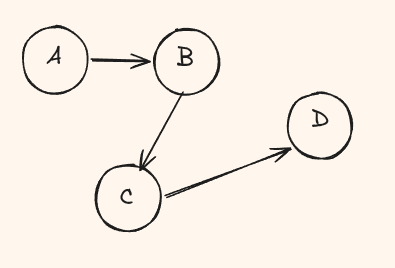
The Three Core Objects
FX Graph has exactly three concepts you need to understand - Graph, Node, and GraphModule.
| Concept | Meaning |
|---|---|
| Graph | A directed graph consisting of several nodes that represents the entire computation. |
| Node | An operation node in the graph (input, operator call, output, etc.) |
| GraphModule | A subclass of nn.Module that wraps Graph |
Let me show you what I mean. Here is a simple model traced with torch.fx.symbolic_trace:
import torch
import torch.fx

class MyModel(torch.nn.Module):
    def __init__(self):
        super().__init__()
        self.linear = torch.nn.Linear(4, 8)

    def forward(self, x):
        return torch.relu(self.linear(x))

gm = torch.fx.symbolic_trace(MyModel())
gm.graph.print_tabular()
This prints:
opcode         name    target                 args         kwargs
-------------  ------  ---------------------  -----------  --------
placeholder    x       x                      ()           {}
call_module    linear  linear                 (x,)         {}
call_function  relu    <built-in fn relu>     (linear,)    {}
output         output  output                 (relu,)      {}
FX Graph flattens the Python code into a series of nodes. This might seem like a lot at first glance but dont worry we will keep unpacking each field.
Graph
A torch.fx.Graph is a computation graph that internally holds a sequence of nodes. You can print it to see the full structure:
print(gm.graph)graph():
%x : [num_users=1] = placeholder[target=x]
%linear : [num_users=1] = call_module[target=linear](args = (%x,), kwargs = {})
%relu : [num_users=1] = call_function[target=torch.relu](args = (%linear,), kwargs = {})
return reluThis is the textual representation of the FX Graph. More on this in the next section.
Node
Node is the basic unit that represents an input, a function call, or an output.
Every Node has mainly 6 fields you will interact with.
node.op
node.op tells you the broad category
of the node. There are exactly six possible values:
placeholder- graph inputget_attr- reading a parameter for instancecall_function- calling a torch op or Python functioncall_method- calling a method on a tensor (like.view())call_module- calling a submodule (likeself.linear)output- graph output
node.name
node.name is the temporary variable name you see with the % prefix
when you print the graph. For example:
%add = call_function[target=operator.add](args = (%x, %y), kwargs = {})
# node.name == "add"
node.args
node.args is a tuple of Nodes that this node depends on.
This is how you trace the dataflow:
%add = call_function[target=operator.add](args = (%x, %y), kwargs = {})
# add depends on x and y

%relu = call_function[target=torch.relu](args = (%add,), kwargs = {})
# relu depends on add
node.kwargs
Same as args but for keyword parameters.
node.users
node.users is the number of times this node is being used by another node.
# Input x is used by 2 nodes
%x : [num_users=2] = placeholder[target=x]
# ...
%add = call_function[target=operator.add](args = (%x, %y))
%neg = call_function[target=torch.neg](args = (%x,))

# node.users[x] would map to {add: 1, neg: 1}
This is essential for graph transforms. Before deleting a node, you must check that
len(node.users) == 0 or redirect its users to a different node first.
It is also how you detect dead code.
node.target
This is the most important field - and also the most confusing, because its meaning depends on node.op. You cannot read target in isolation.
| node.op | target means | example |
|---|---|---|
| placeholder | the argument name | "x" |
| get_attr | dot-separated path to the attribute | "linear.weight" |
| call_function | the actual function object | torch.relu, operator.add |
| call_method | the method name (a string) | "view", "permute" |
| call_module | submodule path | "linear", "block.0" |
Take target="linear". If op is call_module, it means "call self.linear".
If op is get_attr, it means "read self.linear" (which would error since linear is a module, not a tensor).
So always check op before target.
node.meta
node.meta holds metadata information about the node.
How FX Graphs are Built
So far we have seen that torch.fx magically turns python code into this graph, but how? It does this by a concept called symbolic tracing.
Symbolic Tracing
First of, why do we need symbolic tracing?
When normal python code runs, it immediately executes the code and after the execution, you have the result but you dont know how you got there, basically the computation graph.
Hence we turn to symbolic tracing. With symbolic tracing, torch.fx intercepts this call and says "hey, I saw a relu operation"
and creates a Node instead. No actual computation happens. It only simulates it.
This interception is done by Proxy objects. A Proxy wraps each input value and overrides every Python dunder method that could be used in a neural network forward pass:
__add__,__mul__,__sub__for arithmetic__getattr__for attribute access like.shape,.view()__getitem__for indexing likex[0]__torch_function__for torch ops liketorch.relu(x)__call__for submodule invocations likeself.linear(x)
Every time one of these hooks fires, the Proxy creates a new Node and records the operation. The Node stores the opcode, the target function, and the inputs (args/kwargs). By the time forward returns, we have a complete graph.
import torch
import torch.fx

class MyModel(torch.nn.Module):
    def forward(self, x):
        z = x + 1           # Proxy.__add__ fires -> creates Node(op=call_function, target=operator.add)
        return torch.relu(z) # __torch_function__ fires -> creates Node(op=call_function, target=torch.relu)
This is awesome! But this proxy approach has some limitations.
Limitations of Symbolic Tracing
1. Dynamic control flow - if the condition depends on program execution paths that change at runtime based on variables, data, or user input, it can't be traced because Proxies don't have real values to evaluate the condition:
def forward(self, x):
    if x.sum() > 0:     # proxy can't evaluate this!
        return torch.relu(x)
    else:
        return torch.neg(x)
Only one branch is traced (the one taken during tracing), giving you an incorrect graph.
2. Non-torch Python functions - plain Python functions aren't intercepted:
from math import sqrt

def normalize(x):
    return x / sqrt(len(x))

traced = torch.fx.symbolic_trace(normalize)  # fails!
3. Static control flow is fine - if the condition is known during initialization, tracing works perfectly:
class MyModule(torch.nn.Module):
    def __init__(self):
        super().__init__()
        self.do_activation = False
        self.linear = torch.nn.Linear(512, 512)

    def forward(self, x):
        x = self.linear(x)
        if self.do_activation:       # static - not data dependent
            x = torch.relu(x)
        return x

# This traces correctly
Wrapping Up
Understanding FX Graphs are the first step to understanding the entire PyTorch 2.0 compilation stack. So, good job on making it till here.
In the next post, we will look at TorchDynamo - the bytecode-level JIT and how it handles this a bit differently.